
RFC 27 Mobile Controls & Controller Prompts
Last updated:
Find the touch buttons for attacking and defending in RFC 27, then learn how to aim, request a pass and change the camera.
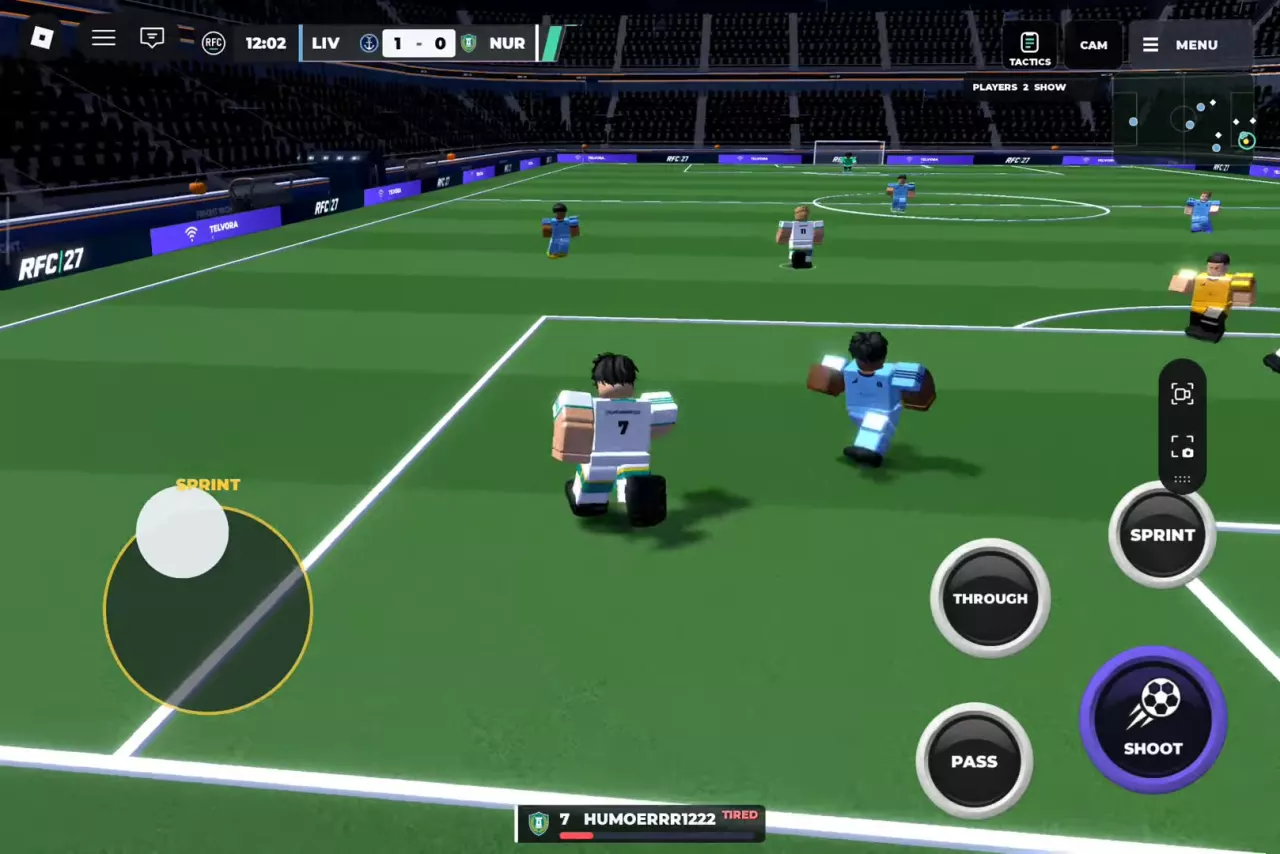
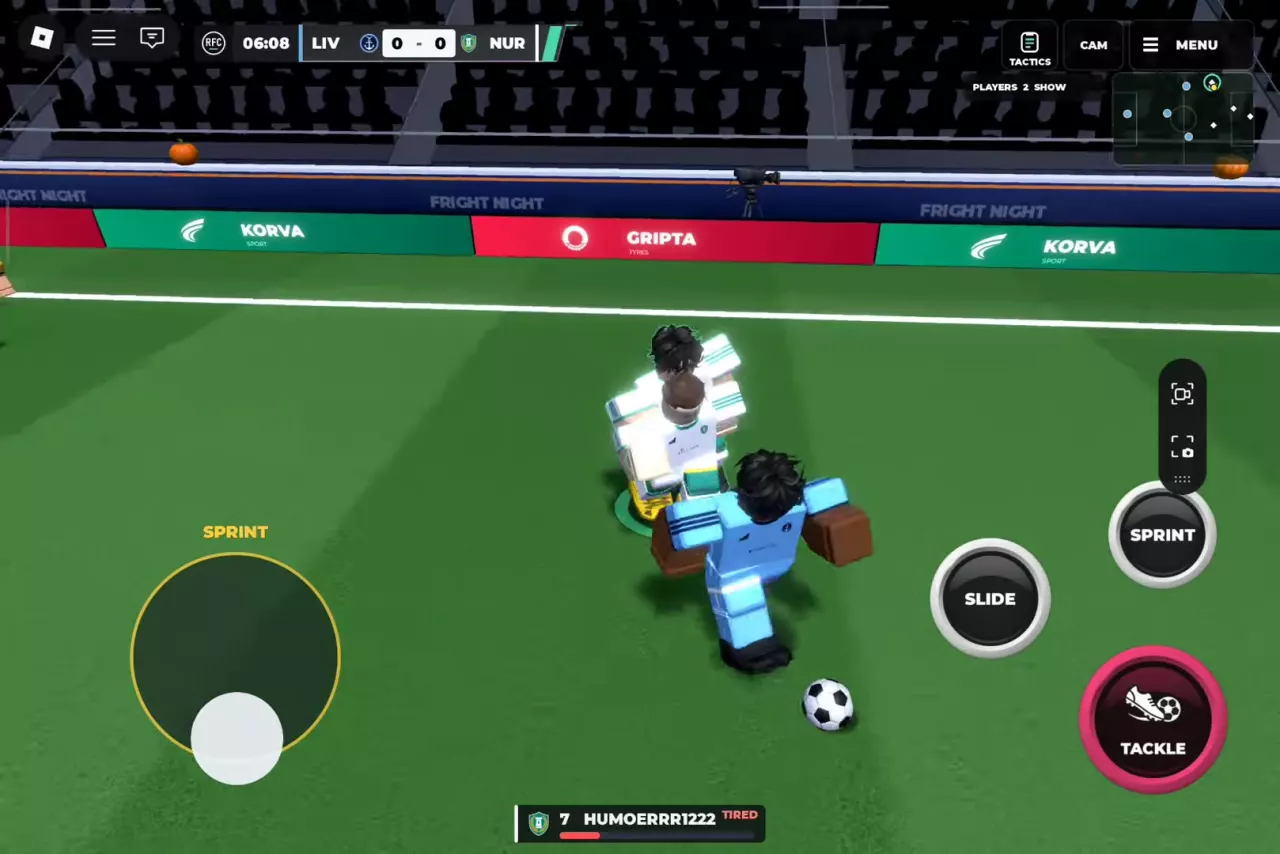
On mobile, move with the left joystick and use the buttons for your current situation: PASS to pass, CALL to request the ball, hold and release SHOOT to shoot, and TACKLE or SLIDE to challenge an opponent. Use CAM to change the camera. PlayStation-style prompts show R2 for sprint, Circle for tackle and Square for slide.
Touch Controls at a Glance
The action buttons change with possession. Movement and SPRINT remain available when attacking or defending.
| Control | When to use it | Portuguese label |
|---|---|---|
| Left joystick | Move in attack or defense | JOYSTICK |
| SPRINT | Accelerate in attack or defense | CORRIDA |
| PASS | Pass while you have the ball | PASSE |
| THROUGH | Play a through ball while attacking | THROUGH |
| SHOOT | Shoot while you have the ball | ATIRAR |
| CALL | Request a pass while a teammate has the ball | CALL |
| TACKLE | Challenge for the ball while defending | IMPACTO |
| SLIDE | Make a sliding challenge while defending | DESLIZAMENTO |
RFC 27 supports phones, tablets, consoles and PC, including console controllers.
Controller Prompts and Camera Changes
With PlayStation-style prompts, use R2 to sprint, Circle to tackle and Square to slide. The directional pad controls the camera.
On a touch screen, tap CAM or CÂMERA to change the view. In the camera tutorial, switch to the TV view and then switch back to the original view.
Pass, Aim and Ask for the Ball
When you have possession, use PASS or PASSE to send the ball to a teammate. If AIM STICK · HOLD PASS appears, aim with the stick and hold PASS. The attacking interface also has THROUGH for a through ball; LONG can appear on the passing aim screen.
When a teammate has the ball, use CALL to request a pass. Your player raises a hand and CALLING! appears; the teammate can still choose to continue the attack instead of passing. If a match prompt tells you to use PASS to ask for the ball, follow that prompt.
Hold, Aim and Release to Shoot
- With the ball, hold SHOOT, labeled ATIRAR in Portuguese.
- Point the joystick toward your target.
- Release the shooting button to take the shot.
In the shooting tutorial, aim for the highlighted green corners of the goal.
Chase, Tackle and Slide
Move toward the opposing ball carrier and use SPRINT when you need to accelerate. Once close, use TACKLE to challenge for possession or SLIDE for a sliding tackle. Either action is an attempt, so it does not guarantee that you will win the ball.
TIRED indicates low stamina; see match flow and stamina indicators for the other match prompts.
Choose a Place to Practice
Choose the Tutorial for guided camera, dribbling, passing and shooting objectives; Practice Pitch for your own ball and goals; or Skill Games in the Training menu for activities that can award Coins. For the tutorial objectives and the route to the pitch, see the Tutorial and Practice Pitch guide.
RFC 27 also supports headers, volleys and skill moves.
-
Tutorial
- Purpose
- Learn camera, dribbling, passing and shooting controls.
- Access
- Training menu; also part of the opening tutorial flow after TAP TO PLAY.
-
Practice Pitch
- Purpose
- Practice with your own ball, shooting and skills.
- Facilities
- Football and goals
-
Skill Games
- Access
- Training menu
- Reward
- Coins (Skill-game rewards)